Open DMG File
Information, tips and instructions
DMG Extractor
DMG Extractor is a software which as follows from its name allows opening and extracting DMG files. Free version of DMG Extractor only allows to extract one file at a time which may make process of retrieving files from DMG cumbersome. Thus 7-Zip is still our first choice for DMG file extraction. But if 7-Zip is unable to open your DMG file or you just want to extract one file from DMG then you can try DMG Extractor since it supports many different DMG formats.
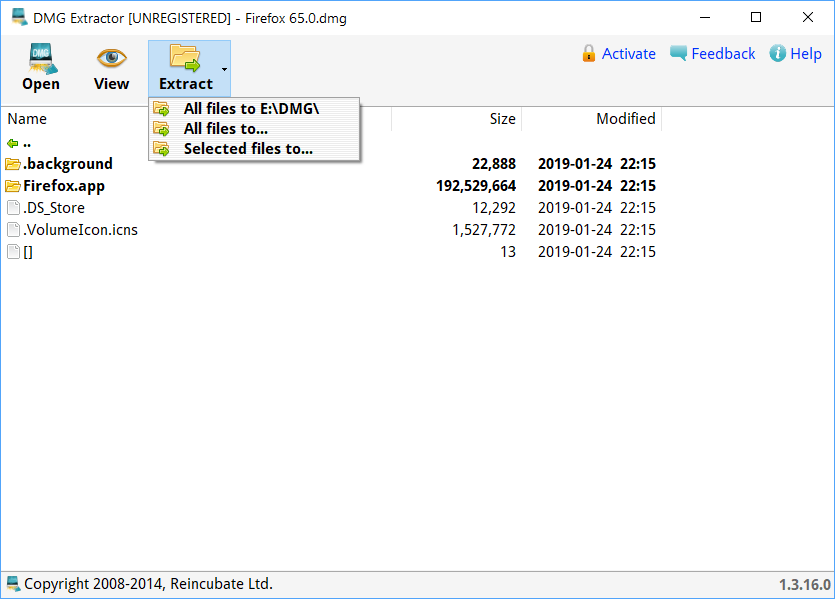
In order to open DMG file in DMG extractor click on Open button in the toolbar. Select the file you want to open and click on Open button in “Open Dmg file” dialog.

After that you will see contents of the DMG file in DMG Extractor main window.

Select files that you want to extract and click on Extract button in the toolbar. DMG Extractor will ask you to select where you want your files to be extracted and after confirming that your files will be extracted to selected location.
Using hdiutil
Hdiutil is a helpful command line utility which allows to manipulate disk images. With hdiutil you can attach, detach, verify, burn and perform other actions with disk images.
Below are several examples of using hdiutil.
To attach (mount) example.dmg disk image type:
hdiutil mount example.dmg
When you mount disk image it will appear under /Volumes folder. If you want to mount disk image under a different path your can either use -mountroot or -mountpath options like in example below:
hdiutil mount -mountpath /Volumes/folder example.dmg
Unmounting disk image is similarly done by the following command:
hdiutil unmount /Volumes/example
You can also burn an image on CD or DVD by running:
hdiutil burn example.dmg
To create a disk image with hdiutil you can use following command:
hdiutil create -encryption -size 10m -volname encdata test.dmg -fs HFS+J
If you need to create a disk image from specific folder type:
hdiutil create -volname DiskImageName -srcfolder /path/to/the/folder -ov -format UDZO example.dmg
| DMG Quick Info | |
|---|---|
| Apple Disk Image | |
| MIME Type | |
|
application/x-apple-diskimage | |
| Opens with | |
|
Open PDF File Translations:
- Japanese Translation
- Italian Translation
- French Translation
- Spanish Translation
- Portuguese Translation
- German Translation
